

Take a screenshot on your iPad
Quickly save what's on your screen.
How to take a screenshot on an iPad without a Home button
Press the top button and either volume button at the same time.*
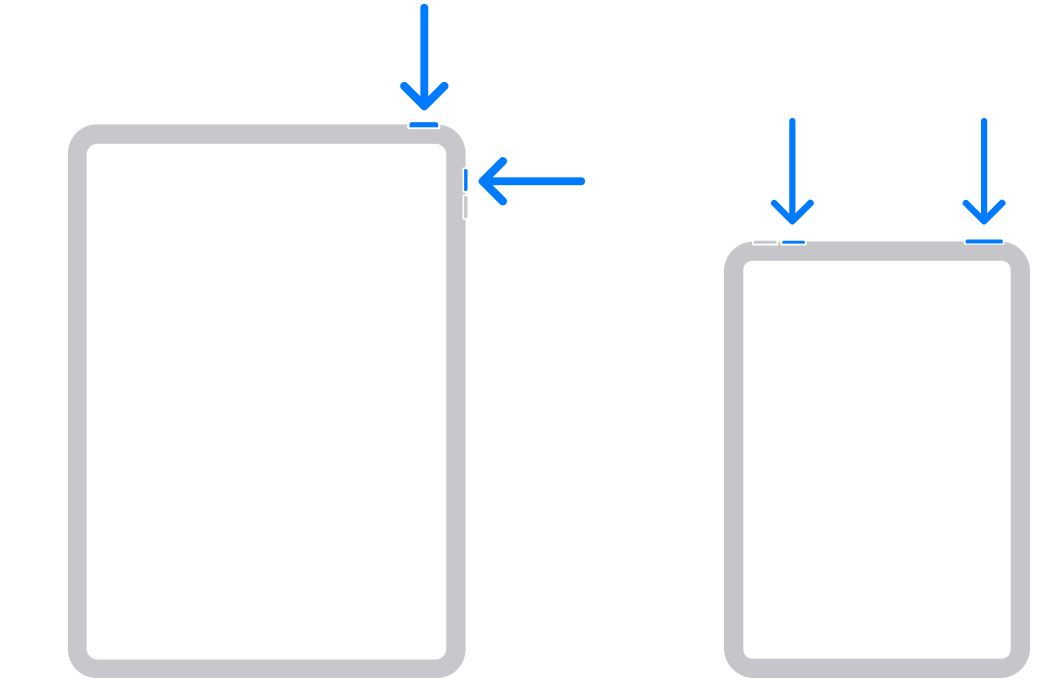
Quickly release both buttons.
After you take a screenshot, a thumbnail temporarily appears in the lower-left corner of your screen. Tap the thumbnail to open it or swipe left to dismiss it.
How to take a screenshot on an iPad with a Home button
Press the top button and the Home button at the same time.*
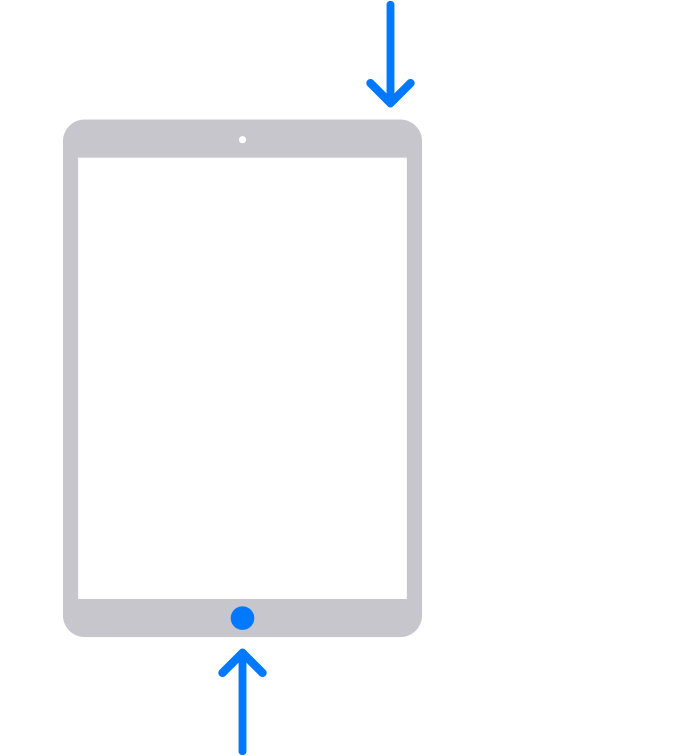
Quickly release both buttons.
After you take a screenshot, a thumbnail temporarily appears in the lower-left corner of your screen. Tap the thumbnail to open it or swipe left to dismiss it.
* If you're not sure, find out which button is which on your iPad.
Where to find screenshots
Open Photos, then tap Collections.
Swipe up, tap Media Types, then tap Screenshots.
OTHER LINKS:
How Do I Take A Screenshot On My Laptop / Computer (PC)?
How Do I Take A Screenshot On My Apple iPhone?
How do I Use Markup on an iPhone, or iPad to Alter Images, Photos, or Screenshots?